
How to Release an Advising Hold in MyGeorgeFox
- Log into MyGeorgeFox (my.georgefox.edu) using your GFU username and password.
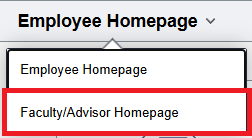
- Navigate to the Faculty/Advisor Homepage
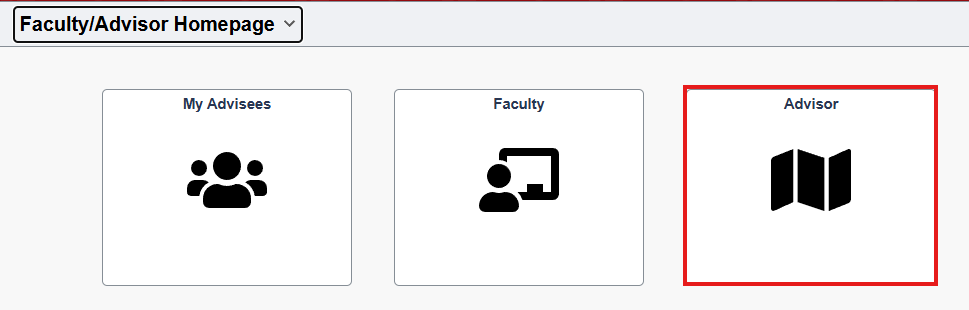
- Select Advisor Tile
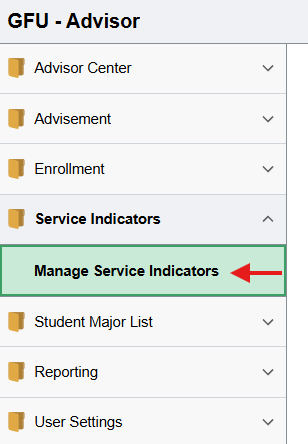
- Expand Service Indicators from the left menu and click Manage Service Indicators.
- Enter the student’s ID number or First and Last Name, click Search.
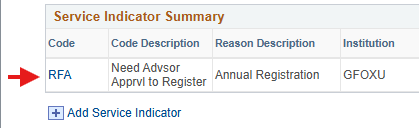
- Click the RFA code for Need Advsor Apprvl To Register row.
- Click the yellow Release button in the upper right corner.
- Click OK to confirm the release.
This method is quick and easy for releasing a hold for one student at a time. However if you’d like to release all your advisee’s holds quickly, see below for an alternative method.
You can also release holds through the Advisor Center by doing the following:
- Click My Advisees in the left menu.
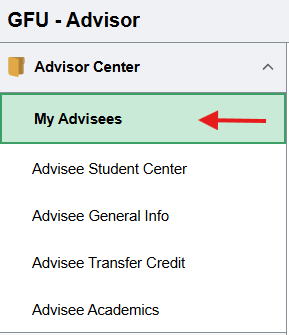
- Click General Info along the top menu.

- Make sure the correct advisee’s name appears at the top, if not, change it from the Change Advisee dropdown menu.
- Find the Service Indicators heading and click the Need Advsor Apprvl To Register row.
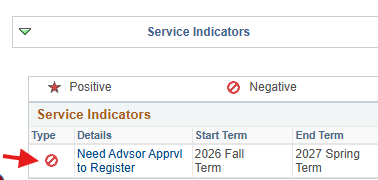
- Click the Release button in the upper right.
- Click OK to confirm.
- Repeat steps 3-6 as needed.